
Cache Autopilot
Targeted cache refresh for WordPress
Knows what changed. Refreshes what matters.
Built for Elementor. Works across WordPress.
When content or shared elements change, Cache Autopilot finds the affected pages and refreshes them automatically, working alongside a supported cache plugin.
Works across your stack:
You build the site.
You configure the plugin.
You hand it over.
Client publishes.
The right pages refresh.
See targeted cache refresh in action
Watch the full 2-minute overview, or jump straight to a focused Elementor demo.
Full overview
See how Cache Autopilot detects changes, refreshes affected pages, and preloads them in the background.
Elementor demo
See reusable Components, Global Widgets, templates, popups, and nested content trigger targeted cache refresh — automatically.
The Problem
Cache plugins are excellent at storing, serving, and purging cached pages. The harder part is knowing which other pages a change affects.
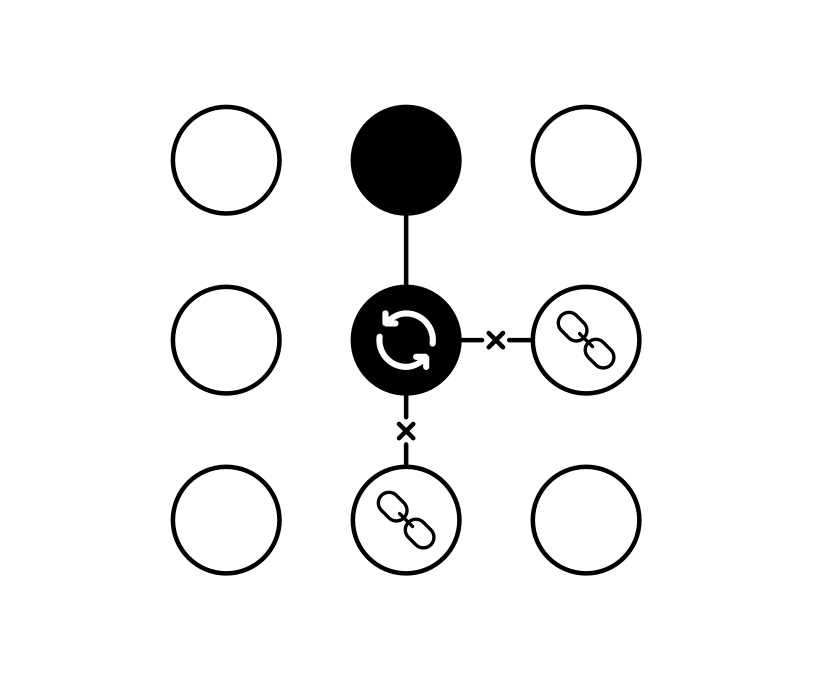
In WordPress, content is often reused or connected, so one change can affect completely different frontend pages.
Without that context, you either purge the obvious URL and risk stale content elsewhere, or flush the entire cache just to be safe.
A full flush works, but it also discards unaffected cached pages, creating unnecessary cold-cache traffic and server load.
How it works
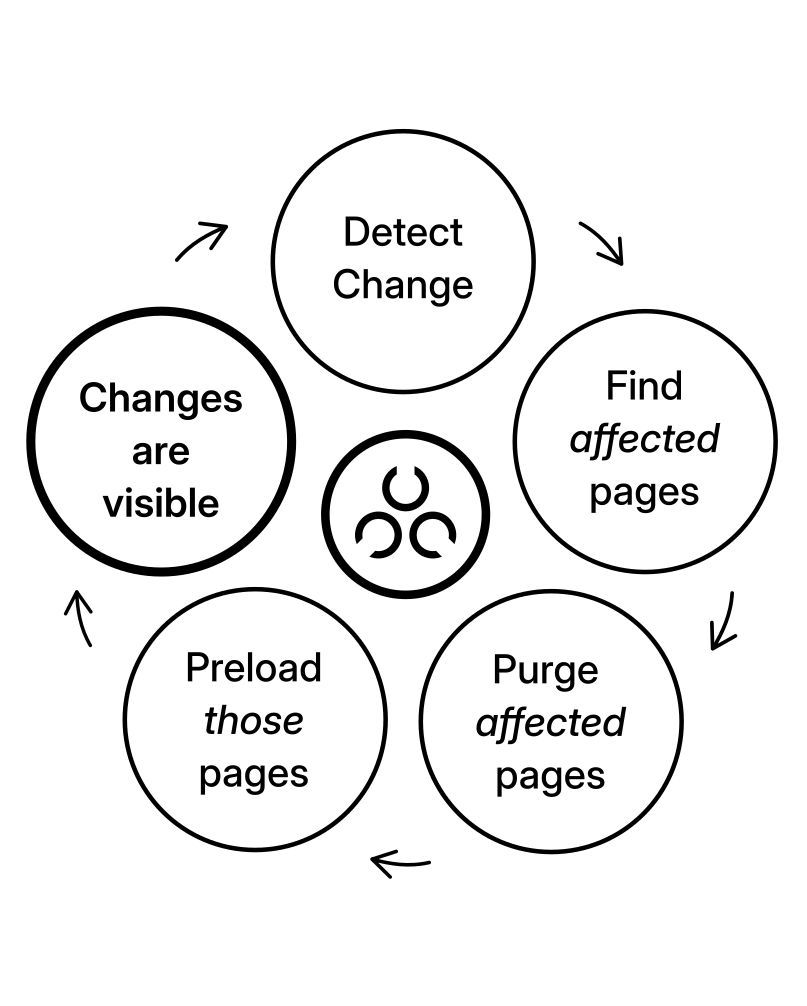
You change content. The affected pages refresh. Cache Warmup preloads them. Done.
Cache Autopilot manages the full cache lifecycle automatically:
- Detect
Cache Invalidator determines which frontend pages are affected — including reused content, templates, relationships, and translations. - Purge
Those pages are purged through your supported cache plugin. Unaffected pages stay cached where possible. - Warm
Cache Warmup preloads the purged pages in prioritized batches, so visitors are more likely to hit a warm cache.
Affected pages are resolved automatically and combined with any targets you’ve defined manually.
Cache Invalidator and Cache Warmup are separate internal engines inside the same Cache Autopilot WordPress plugin. Both work alongside your supported cache plugin.
See: How It Works for the full lifecycle overview.
Safe to test on a real site
Wide Compatibility
- Works with supported cache plugins that provide reliable URL-level purging
- Paced background preload designed to work safely across different hosting environments
Automatic Cache Freshness
- Elementor (PRO) and Gutenberg (Free) — zero config for standard setups
- WooCommerce (Free) — built-in targeting with optional broader product refresh
- ACF relationships (PRO) — a few clicks to configure
Simple & Safe
- Built-in diagnostics and debug logging
- Safe to deactivate
- 30-day refund policy
Built for targeted refresh
- Cache Autopilot integrates with cache plugins that provide reliable URL-level purging.
- That allows affected URLs to be purged directly while unaffected pages stay cached where possible.
- If the affected pages cannot be resolved safely, Cache Autopilot can fall back more broadly rather than risk stale content.
Created by a Swiss WordPress developer who ran into this problem on his own sites — and decided to solve it properly.
Integrations
Works with how your site is actually built — automatically where possible, configurable where needed.
Elementor 4.3 ready
Elementor
Deep structural awareness.
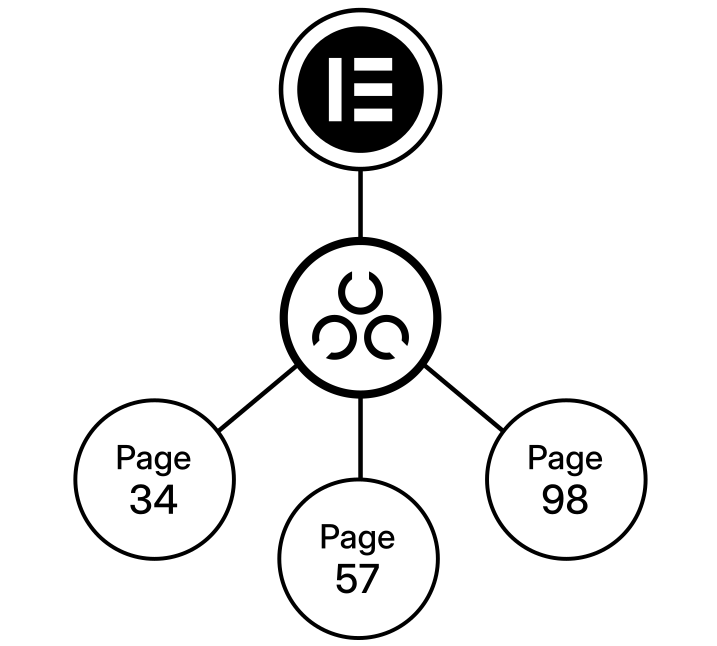
Global widgets, reusable components, Templates (like headers, popups, sections, loop items), Atomic Default Styles and Global Classes — change any shared component and affected frontend pages refresh automatically – even when nested.
Zero configuration for standard setups.
See: Supported Integrations → Elementor
Gutenberg (Block & Site Editor)
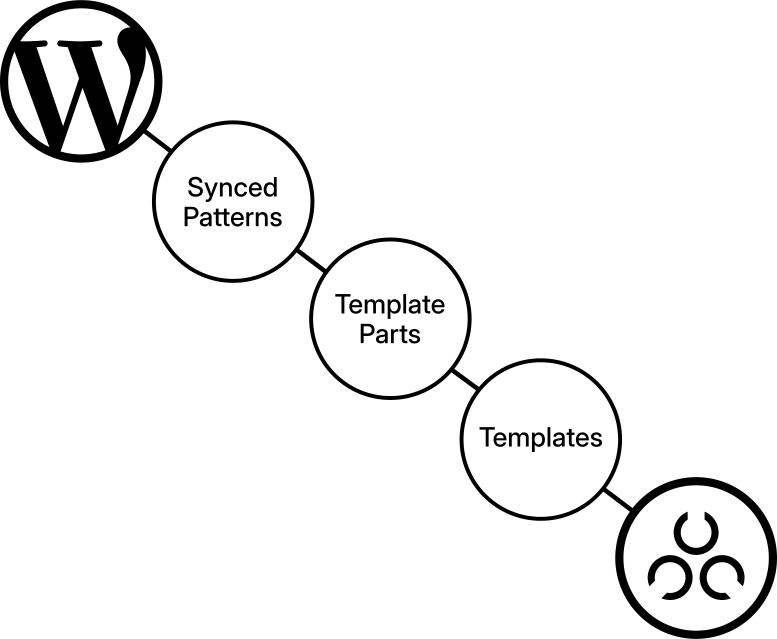
Full nesting chain and template targeting resolved.
Synced patterns, template parts, and templates — including archives, single, and per-post templates — resolved automatically across supported nesting chains.
Zero configuration.
See: Supported Integrations → Gutenberg
Also supported for content and form resolution: Divi, Beaver Builder, WPBakery.
WooCommerce
Storefront stays accurate.
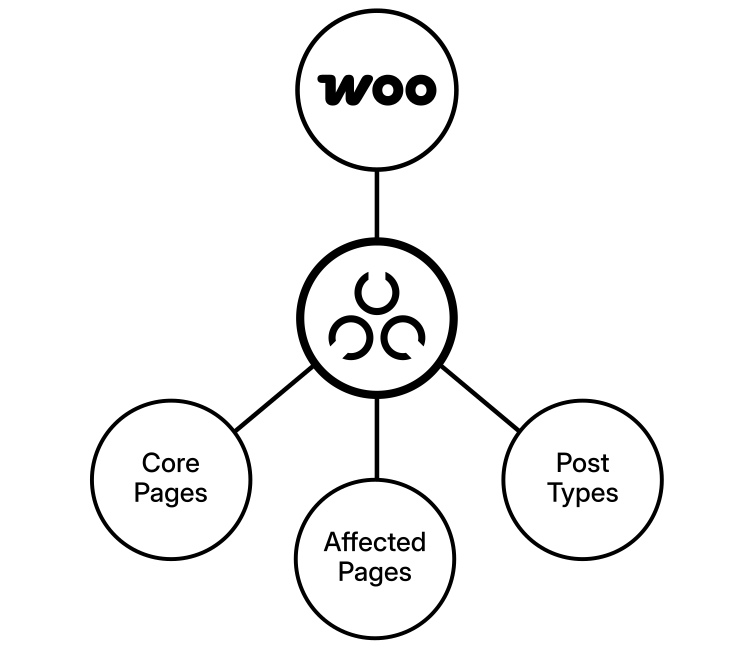
Product updates, variations, upsells, grouped products, and relevant archives refresh automatically — shop included.
By default, Cache Autopilot refreshes only the product pages it can identify as affected. If your product template contains dynamic content such as WooCommerce Related Products, you can instead refresh all product singles — while the rest of the site stays cached.
A few clicks to set up, no coding required.
Advanced Custom Fields (ACF)
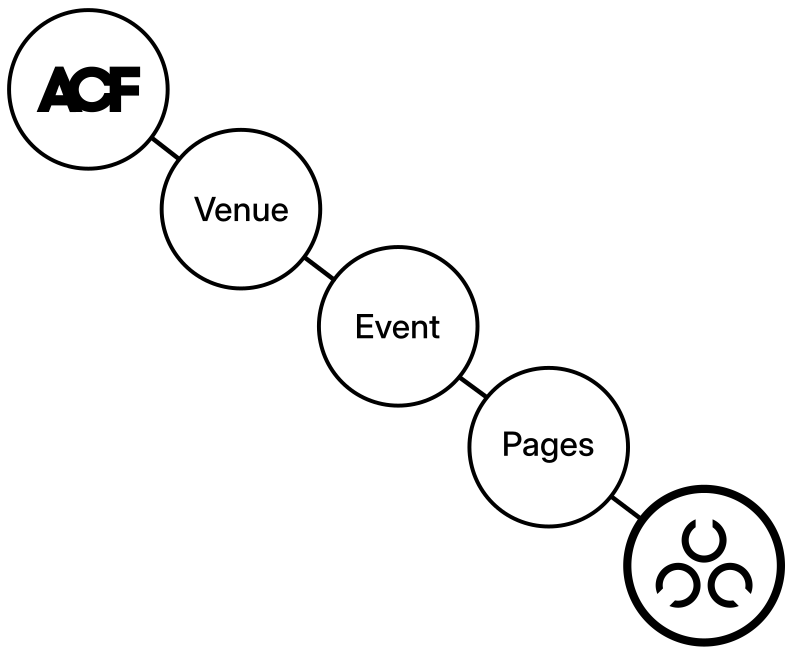
Configured relationships resolve automatically.
When referenced content changes, pages displaying that data refresh automatically — across multi-level chains like Country → Venue → Event.
Built in. Broader product-single refresh can be enabled for dynamic content such as Related Products.
See: Supported Integrations → ACF
Cache Plugins
Targeted cache refresh requires a cache plugin with reliable URL-level purging.
Works with:
- LiteSpeed Cache (free)
- WP Rocket
- WP Fastest Cache (free) – requires 1.5.2+
- WP Optimize (free) – setup notes
- Speed Optimizer (free) – setup notes
- FlyingPress
- SpeedyCache (free)
- Breeze (free)
- Cache Enabler (free)
Multilingual
Translation variants refresh alongside primary content.
Works with:
Form plugins
Form changes resolve which pages embed the form and purge their cache.
Works with:
Have a question?
Whether it’s about compatibility, a feature you need, or something the product doesn’t cover yet — reach out. Questions are welcome before purchase.
Running in production
Set up by the developer, handed off to the client. Settings haven’t been touched since.
Cache management scales down as well as up.
tierpark-bern.ch
Over 1200 posts from 16 custom post types embedded across multiple pages — each post update traces its references.
15 forms across 150 pages — form changes automatically purge the pages that embed them.
Classic widgets and options are mapped to specific pages — updates purge only those pages.
- Shared Hosting (cyon)
- LiteSpeed Cache
- Classic Theme
- WPBakery Page Builder
- Multilingual
beatmusic.ch
17 pages containing synced patterns — pattern changes purge the pages that embed them.
Edit an event — the event page and every event single page showing related events get refreshed.
- Shared Hosting (cyon)
- LiteSpeed Cache
- Gutenberg – Block Theme
- ACF relationships
bernliesteinbuch.ch
Edit a venue — every event referencing it and every page showing related events refreshes automatically.
Form updates purge the pages embedding them — automatically.
- Shared Hosting (Infomaniak)
- Breeze (cache plugin)
- Gutenberg – Block Theme
- ACF relationships
- Multisite install
Reported side effect: suspiciously fresh and fast pages.
More features
Capabilities that matter in production, even if they don’t fit neatly into a demo.
Scheduled cache refresh
Some content goes stale on a clock, not on save — event listings, pricing tables, external feeds.
Scheduled rules can refresh selected pages, all pages, or reuse an existing post type configuration at a set time each day. Scheduled posts are covered too: when WordPress publishes them, the affected pages refresh automatically.
Controlled plugin access
Need editors to manage cache refresh settings without giving them full admin access?
Access control grants Cache Autopilot PRO access by role or individual user. Added users see the plugin tools; remove access and they’re gone.
No WordPress role changes elsewhere.
See: Cache Invalidator → Access Control
Built to be reliable
Warmup auto-paces batches based on server response times, prioritizes important pages, and merges new URLs into a running queue.
Run history shows what triggered each refresh and what happened. Support Debug Mode adds downloadable diagnostics when deeper troubleshooting is needed.
Safe to deactivate: no leftover jobs, no database clutter.
See: Cache Invalidator & Cache Warmup
Two engines. One cache freshness workflow.
Cache Invalidator

Decides what needs to refresh.
Cache Warmup

Preloads what was purged.
Precision over broad purges.
Full-site flushes are a last resort, not the default.
Honest about limitations.
WP-Cron timing is host-dependent. The system handles uncertainty gracefully rather than making promises it can’t keep.
Extensible without modification.
Developer filters extend Cache Autopilot’s resolution for custom WordPress setups without replacing the core decision logic. Customization stays outside plugin code.
Built for developers
Developers can map custom post, option, widget/sidebar, meta, and other changes to the frontend pages they affect through standard WordPress filters.
Add custom post relationship definitions, map options, widgets or non-public post types to pages, and more.
Documentation includes a growing number of ready-to-use snippets for common scenarios.
Most customizations are a short PHP snippet — no plugin code changes needed.
See: Developer Reference → Filters for full hook signatures, examples, and snippet templates.
Pricing
All Cache Autopilot PRO plans include every PRO feature.
30-day money-back guarantee. Secure checkout. Instant access.
Safe to try. Safe to remove.
Single
$
49
Per year
Use on 1 site
1 year of updates
Email support included
Freelancer
$
179
Per year
Use on 5 sites
1 year of updates
Email support included
Agency
$
299
Per year
Use on unlimited sites
1 year of updates
Email support included
Staging and localhost environments do not count toward your site limit.
- Cache Invalidator + Cache Warmup engines
- Every PRO feature and integration (compare Free vs PRO)
- All updates for the license period
- Email support for setup, usage, and compatibility
- Documentation and code examples
- Response times are typically within one or two business days.
- Custom theme or third-party plugin debugging is outside normal scope.
- Feature requests and bug reports are tracked and considered for future releases.
- If you use the free version, please use the WordPress.org support forum for technical support
If Cache Autopilot PRO doesn’t work for your use case, request a refund within 30 days — no questions asked.
FAQ
Getting started
- WordPress 6.5 or later
- PHP 8.0 or later
- A supported cache plugin
- Max execution time: 60s minimum (300s recommended for larger sites)
No. You still need a cache plugin for storage and serving. Cache Autopilot adds intelligent invalidation and warmup on top. It doesn’t modify your database, .htaccess, or cache configuration.
Activate the post types you want to manage in Cache Invalidator, add your sitemap URL in Cache Warmup, and you’re set. Both engines ship with sensible defaults — auto-pacing, fallback handling, and archive resolution work out of the box.
See Getting Started for setup steps.
Cache Warmup shows run history and diagnostics for WP-Cron health and loopback connectivity. Enable debug mode to see invalidation decisions logged.
See Verify it’s working for details.
Compatibility
If you use a supported cache plugin, yes — detection is automatic:
- LiteSpeed Cache (free)
- WP Rocket
- WP Fastest Cache (free) – requires 1.5.2+
- WP Optimize (free) – setup notes
- Speed Optimizer (free) – setup notes
- FlyingPress
- SpeedyCache (free)
- Breeze (free)
- Cache Enabler (free)
New adapters can be added based on demand, if the cache plugin meets the requirements.
Gutenberg and Elementor get deep structural support — templates, synced patterns, reusable components.
See: Supported Integrations → Builders & Content Systems
Divi, Beaver Builder, and WPBakery are also supported for content and form resolution.
Yes. Cache Autopilot includes native WooCommerce support for product updates, variations, upsells, grouped products, core pages, categories, and tags.
By default, it keeps refreshes targeted. For stores with dynamic product-page content such as WooCommerce Related Products, it can refresh all product singles instead — while the rest of the site stays cached.
Set up with just a few clicks.
Yes. ACF relationship and post object fields are resolved automatically once set up in a few clicks — when referenced content changes, pages displaying that data are refreshed.
See: Supported Integrations → ACF
Yes, where the underlying cache plugin supports multisite-aware operations.
How it runs
Set up a server-side cron job to call wp-cron.php at a regular interval. The diagnostics panel tests WP-Cron status and loopback connectivity so you can verify it’s working.
Auto-pacing adjusts batch size based on server response times. You can also set manual limits on batch size, throttle delay, and duration. Actual impact depends on hosting resources.
No. Cache Autopilot focuses on cache freshness and automation — making sure the right pages are cached and up to date. Performance depends on your hosting, cache plugin, and site architecture.
Licensing
Yes. Cache Autopilot is available for free on WordPress.org and includes the core targeted cache refresh and warmup features.
See: Free vs. PRO
Yes. Standard staging domains (.dev, .local, staging.domain.com, and most major hosting providers) do not count toward your site limit — handled automatically.
For custom staging domains, deactivate the licence on the staging site and reactivate it when needed — no site limit consumed.
Yes. Cache Autopilot PRO tiers differ only by number of sites.
Yes. The price difference is prorated.
Cache Autopilot continues to work. You just won’t receive updates — including bug fixes, improvements, and compatibility patches.
Roadmap
Development is driven by real-world usage, not feature checklists. Stability comes first. New capabilities ship when they solve a genuine problem.
Updates ship when ready — not on a fixed schedule. Priorities come from production site needs, support interactions, and the evolving WordPress ecosystem.
Feature requests are welcome and tracked.
Full version history:
Ready when you are.
Install in minutes. If something doesn’t work for your setup, the 30-day refund policy has you covered.
WordPress cache clearing — how it works and what Cache Autopilot does differently
Most cache plugins don’t deeply track how content changes propagate across other pages. They may purge the URL you edited, related archive pages, or sometimes the entire cache — but pages affected through shared content, templates, or other relationships can remain stale until they expire or the cache is flushed more broadly.
Cache clearing removes cached entries — for a single URL, a group, or the entire site. Cache purging removes cached entries. Invalidation decides which URLs need to refresh after a change. Cache Autopilot handles that decision and resolves the affected pages; your existing cache plugin performs the actual purge. Most cache plugins focus primarily on storing and purging cache. Cache Autopilot adds the resolution layer that determines which pages are actually affected.
Cache Warmup can preload the affected URLs again in the background, so visitors are less likely to hit cold pages after a change. Unaffected pages remain cached.
Yes. Cache Autopilot currently integrates with LiteSpeed Cache, WP Rocket, WP Fastest Cache, WP Optimize, Speed Optimizer, FlyingPress, SpeedyCache, Breeze, and Cache Enabler — with WP Fastest Cache support becoming active with their next release.
Yes. Elementor support is included in Cache Autopilot PRO and requires no custom code for standard setups. Cache Autopilot detects changes to reusable Elementor content such as Components, Global Widgets, Saved Templates, Theme Builder templates, Loop Items, Floating Elements, and Popups. It follows nested usage and Display Conditions to resolve the affected frontend pages and refresh their cache automatically. Elementor 4.3 support also includes Atomic Default Styles, Global Classes, and Elementor MCP workflows. Learn more about Elementor support.
Yes. Gutenberg and block theme support is included in Cache Autopilot Free and works automatically for standard setups. Cache Autopilot understands Site Editor templates, template parts, synced patterns, Navigation, global styles, and their nesting through the WordPress template hierarchy. When shared content changes, it resolves the affected frontend pages and refreshes their cache. If WordPress cannot safely determine every affected page, Cache Autopilot can fall back more broadly rather than risk leaving stale content behind. Learn more about Gutenberg support.
Configurable fallback behaviour controls how broadly uncertain changes are handled. Logging lets you verify what triggered the refresh and which targets were selected.